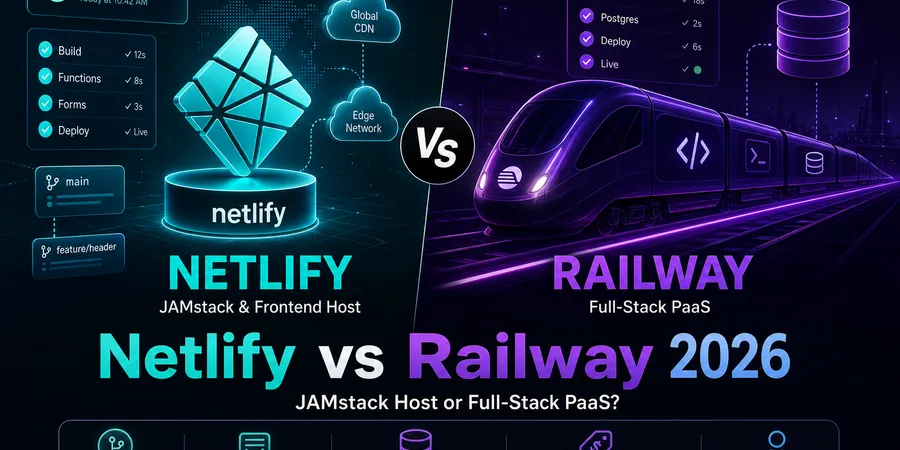
If you’ve typed “Netlify vs Railway” into Google with a repo open in another tab, you’re probably about to make a decision that’s harder to undo than it looks. Both deploy from Git. Both have a generous-sounding free tier. Both market themselves to indie hackers. But they’re not really competing for the same job — and picking the wrong one means migrating in month three when your “simple side project” grows a database, or your “real backend” turns out to be a glorified landing page.
I run DevPicks on Astro hosted on Vercel (more on that in a second), and I’ve spent the last two years helping solo devs and bootstrappers pick where to deploy. This post is the honest Netlify vs Railway breakdown I wish existed: not “which is cheaper hosting” — they’re different product categories — but which one matches the shape of the thing you’re actually building.
TL;DR
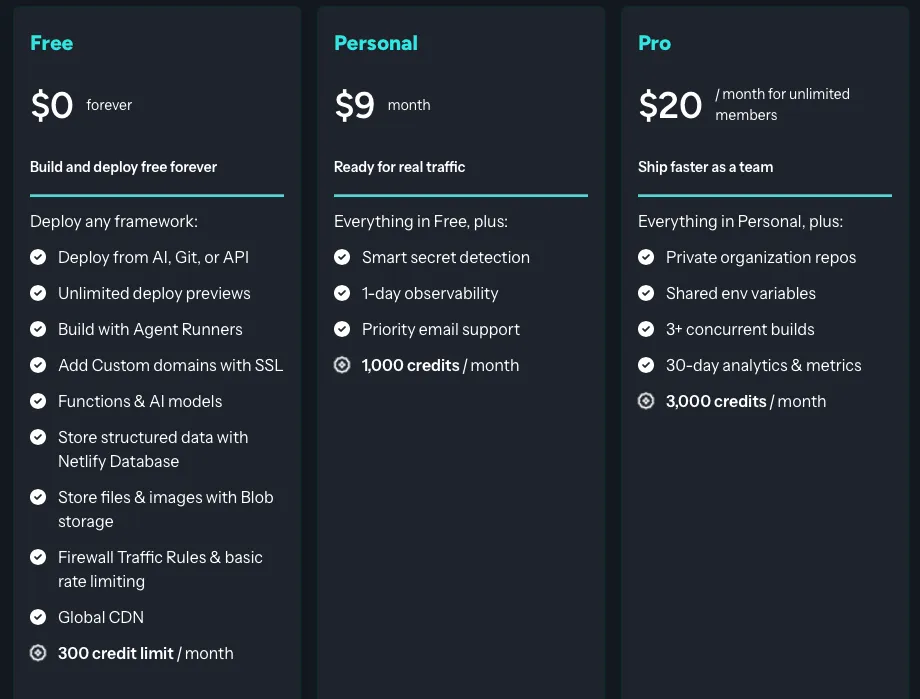
- Netlify — Git-based JAMstack/frontend host. Static sites, Astro/Hugo/Next.js frontends, serverless functions, built-in forms and identity. Credit-based pricing: Free ($0, 300 credits/mo), Personal $9/mo (1,000 credits), Pro $20/mo (3,000 credits).
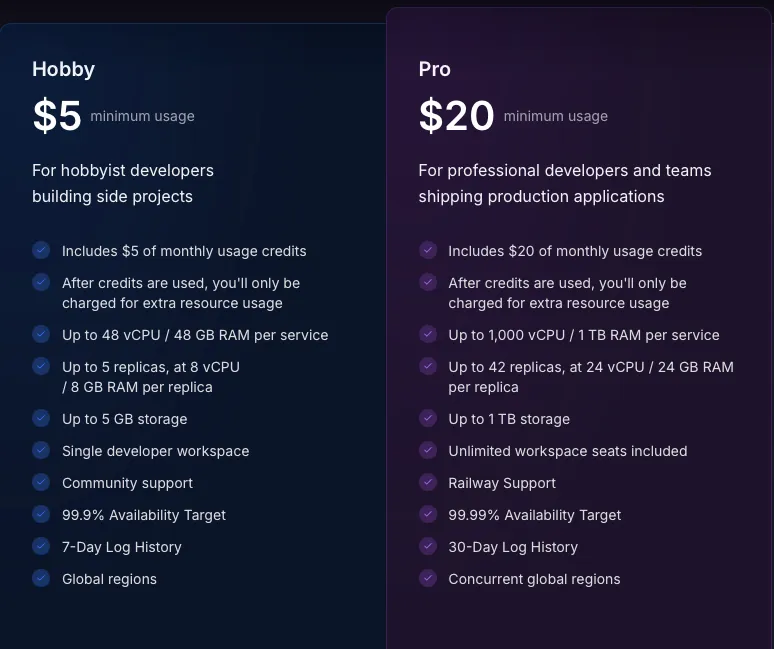
- Railway — Git-push full-stack PaaS. Long-running Node/Python/Go services, Docker, managed Postgres and Redis, background workers. Usage-based: $5 one-time trial credit, then Hobby $5/mo (includes $5 usage credit) or Pro $20/mo (includes $20 usage credit) plus metered CPU/RAM/egress.
- Key insight: This isn’t apples to apples. Netlify is where your frontend lives. Railway is where your API and database live. Pick by app shape, not price.
- My pick: Static or marketing site → Netlify. SaaS MVP with Postgres → Railway. Both at once → split stack (frontend on Netlify, backend on Railway) — yes, that’s a legitimate option.
- Budget note: Netlify bills you in credits (predictable, runs out if you ship traffic). Railway bills you in usage (cheap when idle, surprise when a worker loops). Different failure modes.
Compare current pricing across hosting and dev tools →
What you’re actually comparing
Here’s the framing most posts get wrong. Netlify and Railway both say “deploy from Git” on the homepage, but they sit in different product categories:
- Netlify is a JAMstack / frontend host. You give it a static-site generator or a frontend framework, it runs a build, ships the output to a global CDN, and gives you serverless functions and forms beside it. Long-running processes, persistent disks, and databases are explicitly not the design center.
- Railway is a full-stack PaaS — the spiritual Heroku replacement. You give it a Dockerfile or a Node/Python/Go repo and it runs your app as a long-lived service, attaches a managed Postgres or Redis with one click, and bills you for CPU/RAM/egress as you use them.
If you’re really comparing frontend hosts (Netlify vs Vercel for Astro/Next.js), I wrote that one separately: Netlify vs Vercel 2026. If you’re comparing PaaS vs serverless frontend (Railway vs Vercel for full-stack Next.js), see Railway vs Vercel 2026. This post is the JAMstack-host-vs-PaaS lane that nobody else frames cleanly.
The honest question isn’t “which is better.” It’s: does your app need a long-running process and a database, or does it need a CDN with a contact form? Once you answer that, the platform picks itself.
Netlify: what solo devs get in 2026
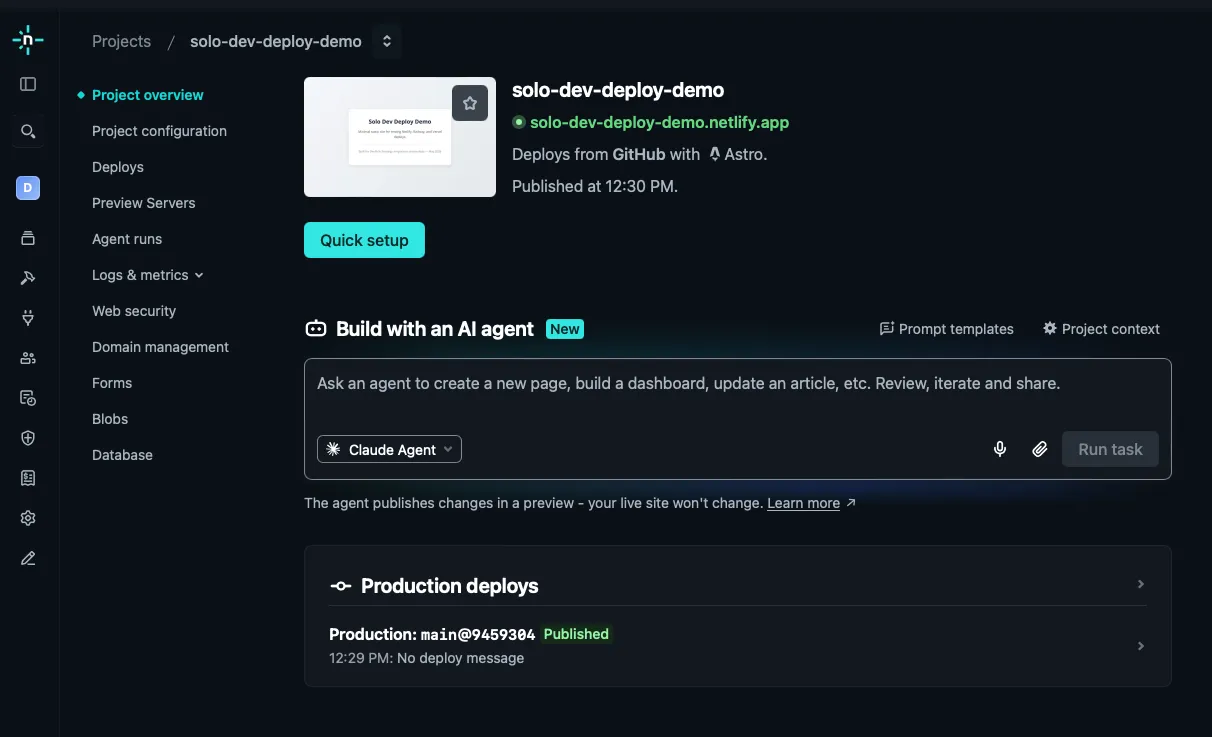
Netlify’s whole pitch is that the frontend developer shouldn’t have to think about servers. You connect a GitHub repo, pick a framework preset, and Netlify runs the build, deploys to a global edge network, and gives you a *.netlify.app URL — usually under a minute for a small Astro site on a clean repo (build time varies with cache state and repo size).
What’s included (per netlify.com/pricing, May 2026):
- PR preview deployments — every pull request gets a unique URL automatically
- Netlify Forms — add
data-netlify="true"to a<form>, and submissions land in the dashboard with spam filtering - Netlify Functions — short-lived serverless handlers (AWS Lambda under the hood); cold starts and execution time limits apply
- Netlify Identity — basic auth without writing a user service
- Edge Functions — logic that runs on the CDN, close to users
- Free: $0, 300 credits/mo (individual) — deploys, bandwidth, compute, and requests consume credits (e.g. 15 credits per production deploy, 20 credits per GB bandwidth)
- Personal: $9/mo, 1,000 credits/mo — smart secret detection, 1-day observability, priority email support
- Pro: $20/mo, 3,000 credits/mo (team-oriented) — shared env vars, private org repos, 3+ concurrent builds, 30-day analytics
Honest cons I’d want a solo dev to know:
- It is not a backend host. Netlify Functions are short-lived. There’s no persistent disk, no “always-on” worker, no managed Postgres. If you try to run a Discord bot or a long polling job here, you’ll fight the platform.
- Credit math can surprise you. Build minutes, bandwidth, and function invocations all draw from your credit pool. A viral blog post can quietly burn through a month’s credits.
- Forms have submission limits on lower tiers — fine for a contact page, painful if you suddenly get thousands of newsletter signups without upgrading.
Netlify is the right tool when your app is mostly HTML and JS shipped to a CDN, plus a sprinkle of serverless glue.
See the full program details on the Netlify affiliate program page.
Railway: what solo devs get in 2026
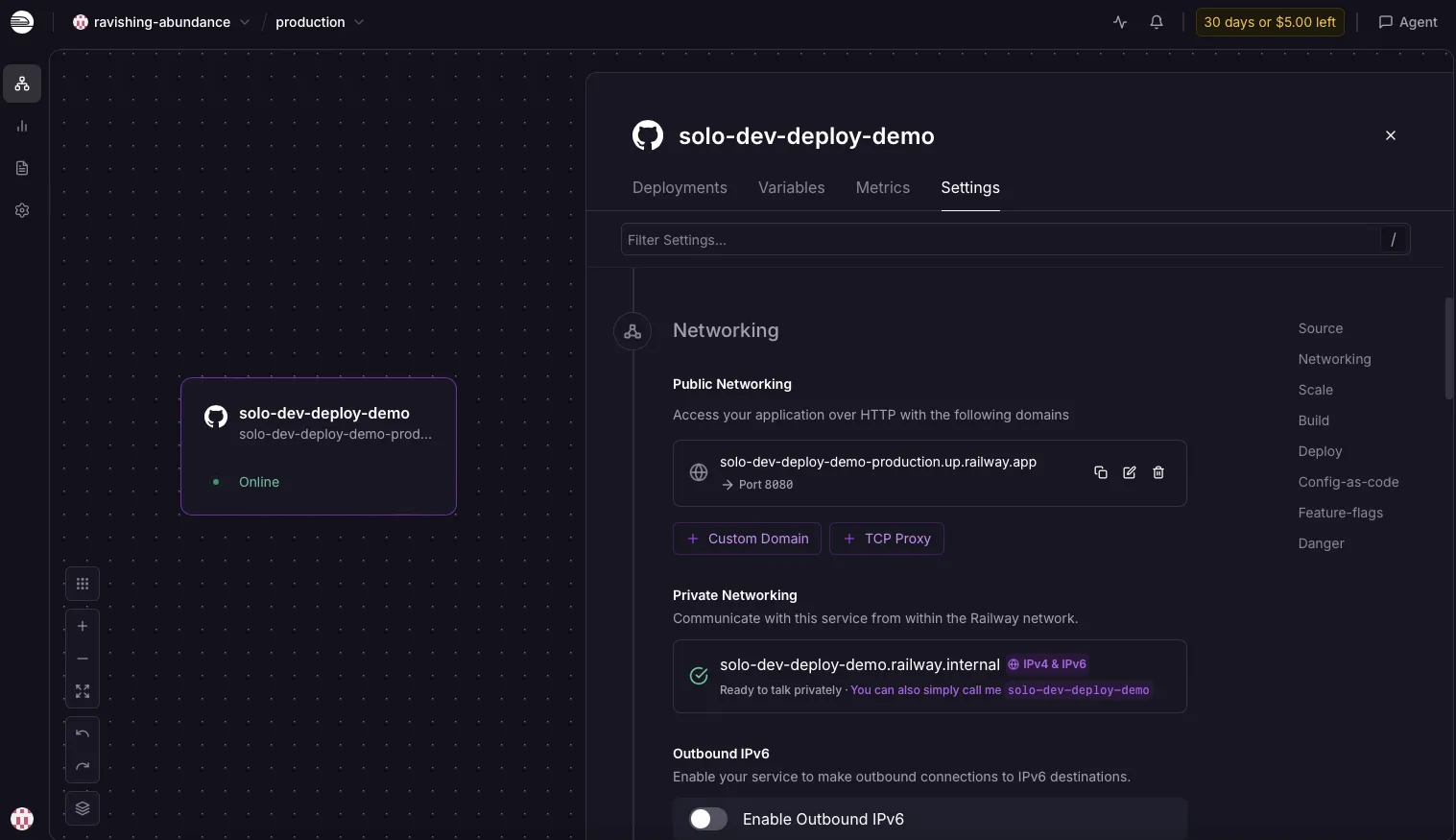
Railway feels like Heroku circa 2012, except the dashboard isn’t stuck in 2012. You push code, Railway detects the runtime via Nixpacks or builds from your Dockerfile, and runs your service as a long-lived container. Click “New” → “Database” → “PostgreSQL” and you typically get a connection string in under a minute (varies by region and load).
What you get (per railway.com/pricing and Railway docs, May 2026):
- Git-push deploy — connect GitHub, push to main, Railway builds and rolls
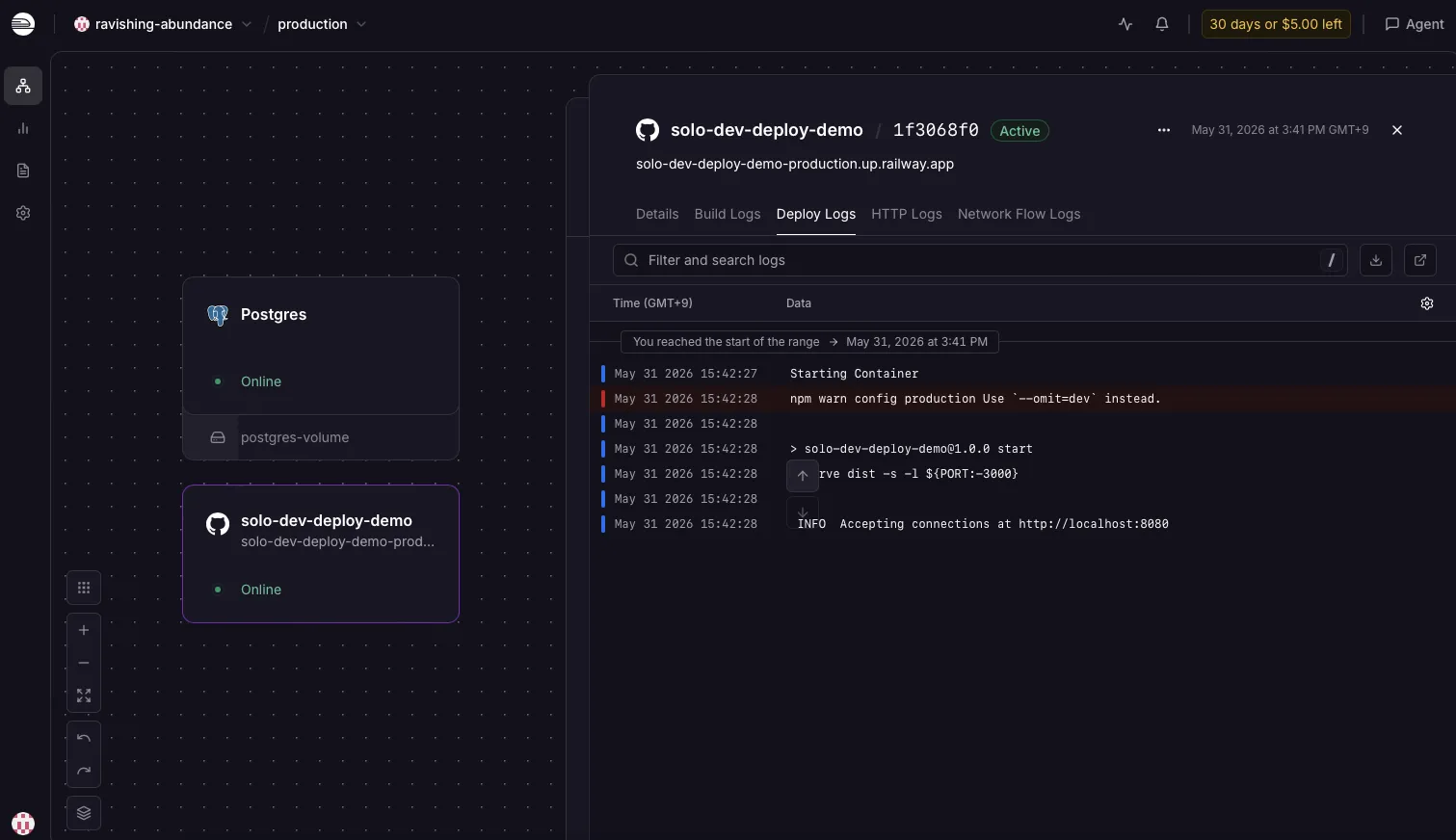
- Managed Postgres, Redis, MySQL, Mongo — added as services inside your project, networked privately to your app
- Docker support — bring any image, run any language
- Background workers, cron jobs, multi-service projects — a web service, a worker, and a database in one dashboard
- Logs, metrics, environment variables, deploy history — the operational basics done well
Pricing model:
- Trial — $5 one-time credit on signup
- Hobby — $5/mo — includes $5 usage credit; fine for one small always-on service plus a small DB
- Pro — $20/mo — includes $20 usage credit, team features, priority support
- Metered beyond included credit: RAM $10/GB/mo, CPU $20/vCPU/mo, egress $0.05/GB, volume storage $0.15/GB/mo
Honest cons:
- Overkill for a static marketing site. A Hugo blog with no backend on Railway means paying for a container that serves files — Netlify (or Cloudflare Pages) does this better and cheaper.
- Usage billing is the bill-shock vector. A misconfigured service, a memory leak, or a forgotten staging environment can push your bill higher than expected. Set spend alerts and read the metrics tab.
- No built-in form handling, identity, or edge functions — those are things you build with code or wire up to third-party services. Railway is more “you bring the app, we run it.”
- After the trial credit, the realistic floor is Hobby at $5/mo — even if usage stays under the included credit, you still pay the subscription fee.
Railway is the right tool when your app is a long-running process that needs a database.
See the full program details on the Railway affiliate program page.
Head-to-head: 5 solo-dev deploy tasks
Walkthrough note. Dashboard screenshots in this post are from the author’s test accounts (May 2026). Task-by-task comparisons still follow official docs and common solo-dev deploy patterns — not timed benchmarks.
1. Deploy a static Astro or marketing site from GitHub
- Netlify: Connect GitHub, pick the repo, Netlify auto-detects Astro, sets
npm run buildanddist/. First deploy often ships in roughly a minute for a small site. Custom domain + free TLS in the dashboard. - Railway: Possible — point Railway at the repo, add a static-serve
Dockerfileor use a Node static server, expose port 80. Works, but you’re paying for a running container to serve files a CDN should serve.
- Winner: Netlify, clearly. Wrong tool for Railway.
2. Add a contact form without writing a backend
- Netlify: Add
data-netlify="true"to the<form>tag, push, done. Submissions appear in the dashboard. Spam filtering included. - Railway: You’d build a tiny POST endpoint (Node/Express, Python/Flask), connect it to a database or email service, deploy as a service. Maybe 30–60 minutes of work.
- Winner: Netlify — an underused feature that removes a whole backend service.
3. Deploy a Node API + PostgreSQL on one platform
- Netlify: Not really. Netlify Functions can act as small API endpoints, but there’s no managed Postgres and no persistent backend process. You’d bring an external DB (Neon, Supabase) and stitch it together — workable, not native.
- Railway: This is the home turf. New project → add your Node service → add Postgres as a sibling service → Railway injects
DATABASE_URL. A clean repo typically deploys in under ten minutes on first setup.
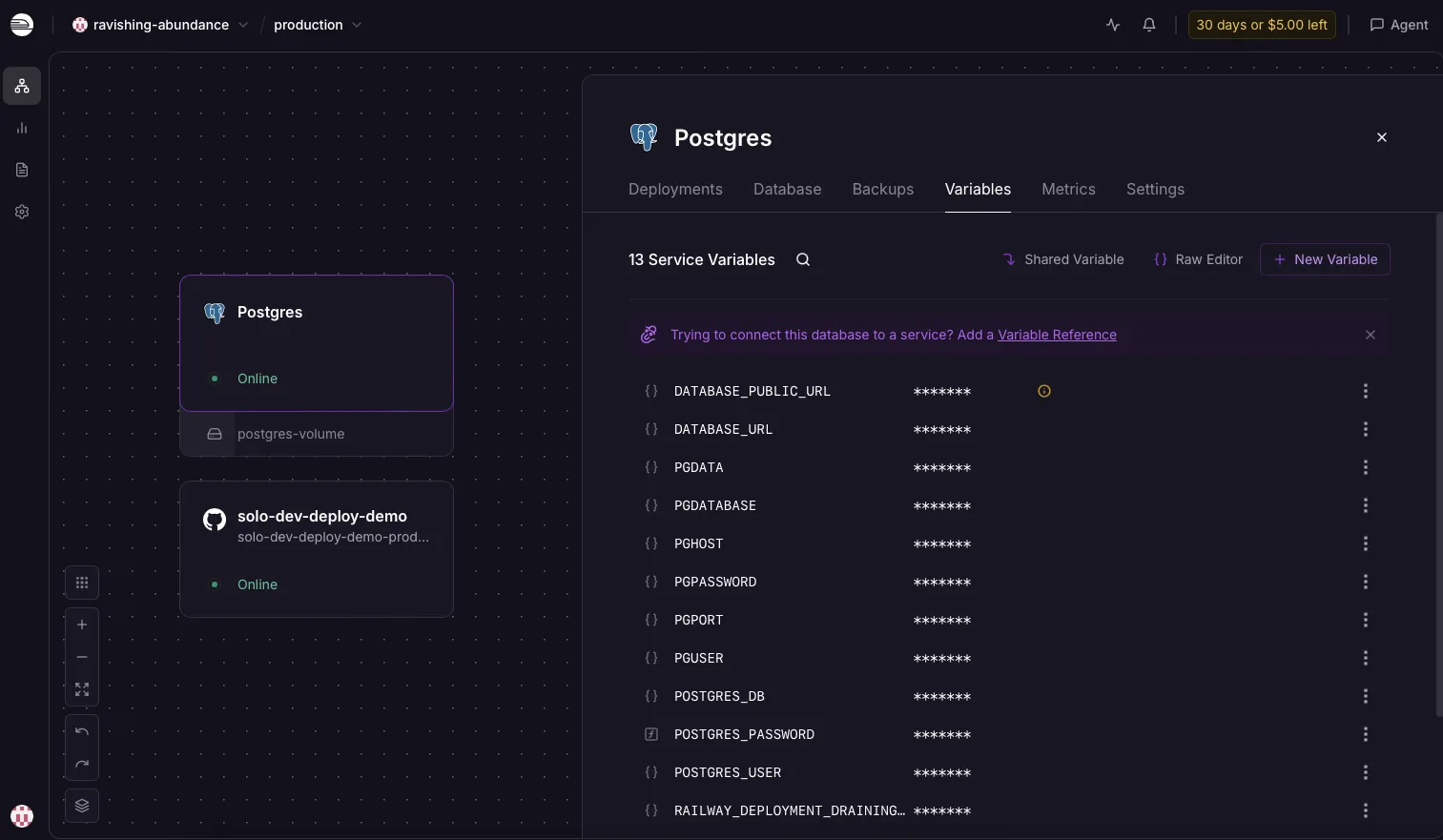
- Winner: Railway, unambiguously.
4. Preview deployment on a pull request
- Netlify: Automatic PR previews with a unique URL — a long-standing feature, zero config for frontend repos.
- Railway: PR environments are supported when configured — useful when your preview needs a working API and database behind it.
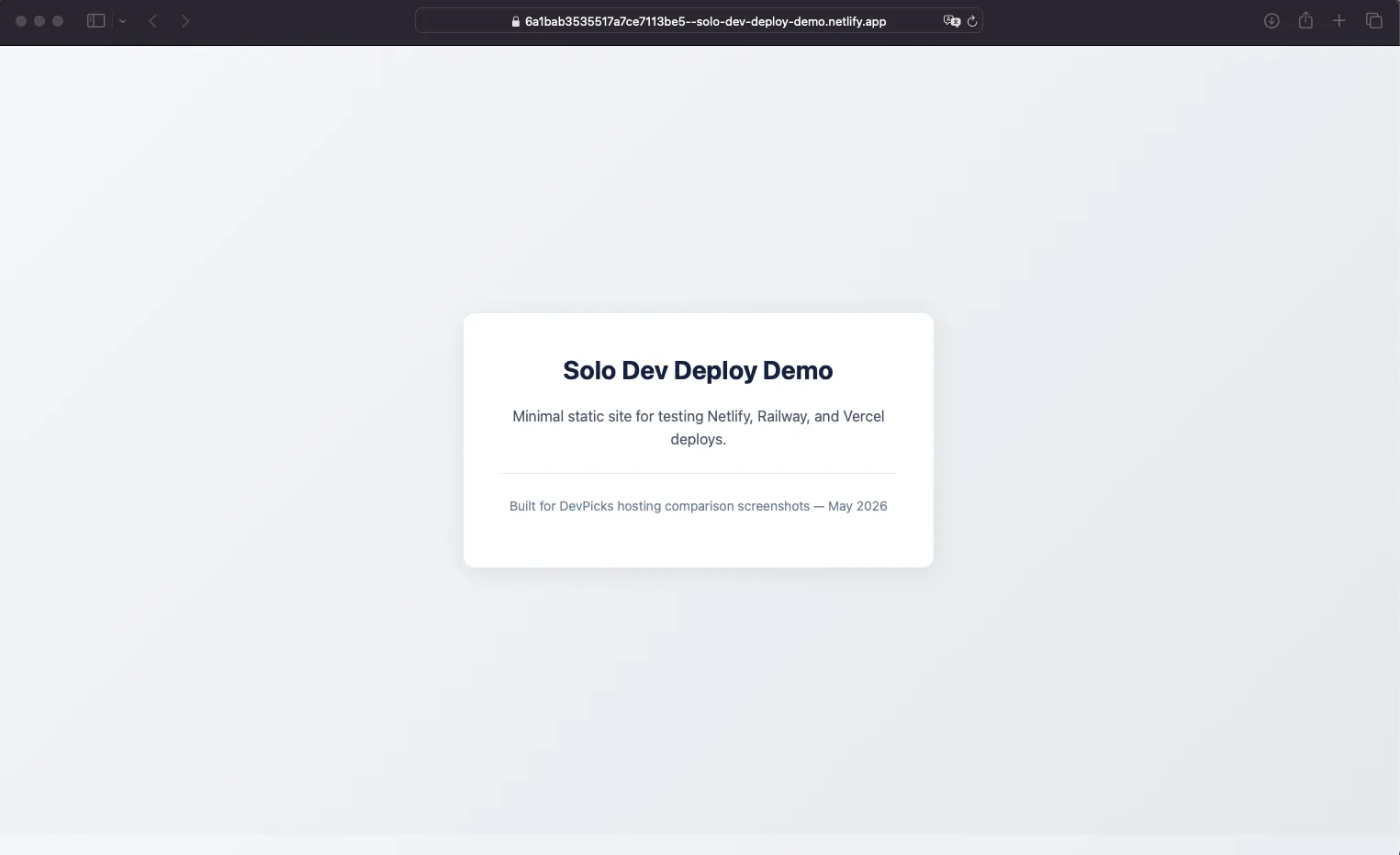
- Winner: Tie, with a caveat. Netlify’s previews are zero-config and solid for frontend reviews. Railway’s are more powerful when your preview needs a real backend. Different jobs, both work.
5. Monthly cost at solo scale
Two realistic scenarios — model your own stack in the stack cost calculator before treating these as guarantees:
-
Astro marketing site, ~10k visitors/month, a contact form
- Netlify: likely fits the Free tier — ~$0.
- Railway: a running container plus bandwidth — likely $5–10/mo on Hobby after the trial credit.
- Winner: Netlify.
-
Node API + small Postgres, ~100k requests/month, background worker
- Netlify: not natively possible. You’d add an external DB host and bolt things together.
- Railway: Hobby at $5/mo + usage — for modest load often stays near the included credit, but verify with Railway’s dashboard after month one.
- Winner: Railway.
Score: Netlify wins tasks 1 and 2, Railway wins tasks 3 and 5, task 4 is a tie. That’s the pattern of the entire comparison — they’re not competing for the same job.
Netlify vs Railway pricing breakdown
| Tool | Price | Pros | Action |
|---|---|---|---|
| Netlify | Free ($0, 300 credits/mo) · Personal $9/mo · Pro $20/mo |
| Try → |
| Railway | $5 trial credit, then Hobby $5/mo (incl. $5 usage) or Pro $20/mo |
| Try → |
The two billing models are the thing to internalise:
- Netlify uses credits. You pay a flat plan fee and draw down a credit pool. Predictable until you blow through it; then builds queue or credit packs apply (e.g. $5 per 500 credits on Personal per Netlify pricing).
- Railway uses metered usage. Cheap when your service is small and idle; scales with CPU, RAM, and bandwidth as you grow. Easy to underestimate if you don’t watch the dashboard.
Neither is universally cheaper. For a static site with modest traffic, Netlify Free usually wins. For a small full-stack MVP, Railway Hobby at $5/mo is hard to beat without going to Fly.io or self-hosting on a VPS — but only if you actually need a backend runtime.
My verdict: who should get which
Get Netlify if you’re:
- Shipping a static or JAMstack site (Astro, Hugo, Eleventy, Next.js static export)
- Running a marketing site, blog, portfolio, or docs
- Want a contact form, newsletter signup, or simple lead capture with zero backend
- Need PR previews for client review on a frontend project
- Predictable monthly bill > flexible scaling
DevPicks itself stays on Vercel (static Astro on Hobby, ~$0/mo) because the site is frontend-only — I didn’t need Netlify’s forms or Railway’s Postgres for this project. That choice doesn’t invalidate Netlify for JAMstack or Railway for backends; it just matches our stack shape. See Netlify vs Vercel 2026 if you’re choosing between frontend hosts.
Get Railway if you’re:
- Building a SaaS MVP with a real backend (Node/Python/Go API + Postgres)
- Running background workers, cron jobs, or Discord/Slack bots
- Using Docker for reproducibility
- Want one dashboard for app + database + cache
- Comfortable watching a usage meter
Use both (split stack) if:
- Your frontend is static or JAMstack and your backend is a real API with a database. Host the marketing site / app shell on Netlify, host the API + Postgres on Railway, point the frontend at the Railway API via env-var-baked URL. This is what a lot of indie SaaS stacks look like in 2026 — not a hack, a legitimate pattern.
Skip both if:
- You’re shipping a Next.js app with App Router and server components everywhere — Vercel is the path of least resistance (Railway vs Vercel 2026 covers that lane).
- You want a purely static site at the absolute lowest cost with global edge — Cloudflare Pages is hard to beat.
- You’re already on Fly.io or Render for backend reasons — no reason to migrate just to be on Railway.
- You need an enterprise-grade Postgres with HA, point-in-time recovery, and SOC 2 today — look at Neon, Supabase, or managed RDS rather than the Railway Postgres add-on alone.
Across DevPicks and a few side projects, hosting spend is roughly $0/month on Vercel Hobby today; anything with Postgres and a worker would land on Railway Hobby at $5/mo minimum after the trial credit. The friction I see most often is misconfigured env vars on first deploy — on Railway especially when DATABASE_URL isn’t wired before the first boot — not catastrophic platform outages. I’ve also watched Netlify credit pools drain faster than expected when a static site with heavy builds ships multiple times a day.
FAQ
Can Netlify host a backend with PostgreSQL?
Not really, not natively. Netlify Functions can act as small API endpoints, but there’s no managed Postgres on the platform and no long-running process model. The common pattern is Netlify Functions + an external managed DB (Neon, Supabase, PlanetScale). It works, but if your app is “API + database,” Railway is the more natural home.
Is Railway overkill for a static website?
For a pure static site with no backend, yes — you’d be paying for a container to do a CDN’s job. Netlify, Cloudflare Pages, or Vercel’s static tier all fit better. Railway makes sense the moment you have a long-running server or a database in the mix.
Netlify vs Railway pricing for solo developers — which is cheaper?
Depends entirely on app shape. For a static marketing site, Netlify’s Free tier (300 credits/mo) usually beats Railway’s Hobby at $5/mo. For a small full-stack app, Railway’s $5/mo + usage beats stitching Netlify Functions to an external database. There’s no one-line answer; that’s why the comparison exists.
Should I use Netlify and Railway together?
Yes, and it’s an underused pattern. Frontend (Astro, SvelteKit, Next.js static) on Netlify; API + Postgres on Railway; frontend hits the Railway API over HTTPS. You get good CDN/preview/form experience for the frontend and good DB/worker experience for the backend, on two free or near-free tiers.
Which is easier for a first-time side project deploy?
If the project is a static site or marketing page: Netlify — connect repo, click deploy, done in a few minutes. If the project is a Node/Python app with a database: Railway — connect repo, click “Add Postgres,” click deploy, done in about ten. Both are noticeably easier than configuring a VPS from scratch.
Wrapping up
The “Netlify vs Railway” question is really a question about your app’s architecture, not its hosting bill. Netlify wins the JAMstack/frontend lane with forms, previews, and credit-based pricing that stays predictable until it doesn’t. Railway wins the full-stack PaaS lane with one-click Postgres, Docker support, and a usage model that’s cheap when idle and metered when busy.
If you want a quick total of what your whole stack actually costs each month, the stack cost calculator totals hosting, DB, email, and analytics in one view.
Both platforms have a low-cost starting point — Netlify’s Free tier and Railway’s $5 trial credit — so the migration cost from “I picked wrong” is your time, not your money. Pick by the shape of the app in your repo today, not the app you might build someday.
For the affiliate programs themselves (if you’re a creator pointing readers at these tools): Netlify affiliate program and Railway affiliate program.
Start on Railway →