If you’re a solo dev with a side project that’s almost shipping, the Netlify vs Vercel 2026 debate probably hit your browser tabs sometime last week. Both platforms have free tiers that cover hobby projects, both deploy from GitHub in a minute or two, and both have horror stories on Hacker News about surprise bills when a post hits the front page.
This post is written for the version of me from two years ago who just wanted a straight answer: which one should I point my domain at, and what’s it going to cost when traffic actually shows up? For personal context: DevPicks currently runs on Vercel (static Astro site), with hosting spend around $0/month on the Hobby tier across a few side projects.
We’ll skip the enterprise feature matrices. Instead: five real deploy tasks, honest cons for both, and a “skip both” section because sometimes the right answer is Cloudflare Pages or a $5 VPS.
TL;DR
- Netlify: Best for static sites, JAMstack, and projects that need built-in forms or simple serverless. Free ($0, 300 credits/mo) for hobby projects; Personal is $9/mo (1,000 credits) when you outgrow free; Pro is $20/mo (3,000 credits, team-oriented).
- Vercel: The Next.js-native default. Edge network and preview UX are hard to beat if you’re already in the React/Next ecosystem. Hobby is free (personal, non-commercial); Pro is $20/user/mo plus included usage credit.
- Key insight: The “which is cheaper” question is a trap — at solo-dev scale, both are free until you cross credit, bandwidth, or build thresholds. Netlify’s first individual paid step is Personal at $9/mo; Vercel jumps from free Hobby to Pro at $20/user/mo for commercial work.
- My pick: Vercel if you’re building with Next.js and value zero-config deploys; Netlify if you’re shipping static sites, Astro, or want forms/identity without wiring a backend.
- Budget note: Both free tiers can cover real side projects — Netlify via credits, Vercel Hobby via included limits — but overage models differ once you upgrade. Compare current pricing with our stack cost calculator before committing.
What you’re actually comparing
A quick note before we go further: many affiliate listings tie Vercel to their v0 / Dub partnership, and v0 is Vercel’s AI UI generation tool — not the hosting platform. This post is about Vercel the hosting platform (Next.js deploys, edge functions, preview URLs), not v0 the AI scaffolder. I’ll mention v0 briefly later because it’s a genuinely useful bonus if you’re already on Vercel, but the comparison here is hosting vs hosting.
Both Netlify and Vercel are Git-based platforms-as-a-service: you connect a repo, push to a branch, they build and deploy. Both give you preview URLs per PR, serverless functions, automatic HTTPS, and a CDN. The differences are at the edges — which framework gets the best treatment, what extras come bundled, and how the pricing curves bend when you exceed free-tier limits.
If you’re choosing between these two, you’ve probably already ruled out:
- AWS / GCP raw — too much yak-shaving for a side project
- Cloudflare Pages — viable, especially if you’re static-only (we’ll revisit in “skip both”)
- Railway / Render / Fly.io — better if you need long-running servers, databases, or background workers
Netlify and Vercel both shine for frontend-heavy apps with some serverless glue. That’s the lane.
Netlify: what solo devs get in 2026
Netlify’s pitch hasn’t fundamentally changed since they coined “JAMstack”: git push, get a deployed site, plus a small toolkit of useful extras.
What’s included (per netlify.com/pricing, May 2026):
- Continuous deployment from GitHub, GitLab, Bitbucket
- Deploy previews on every PR with a shareable URL
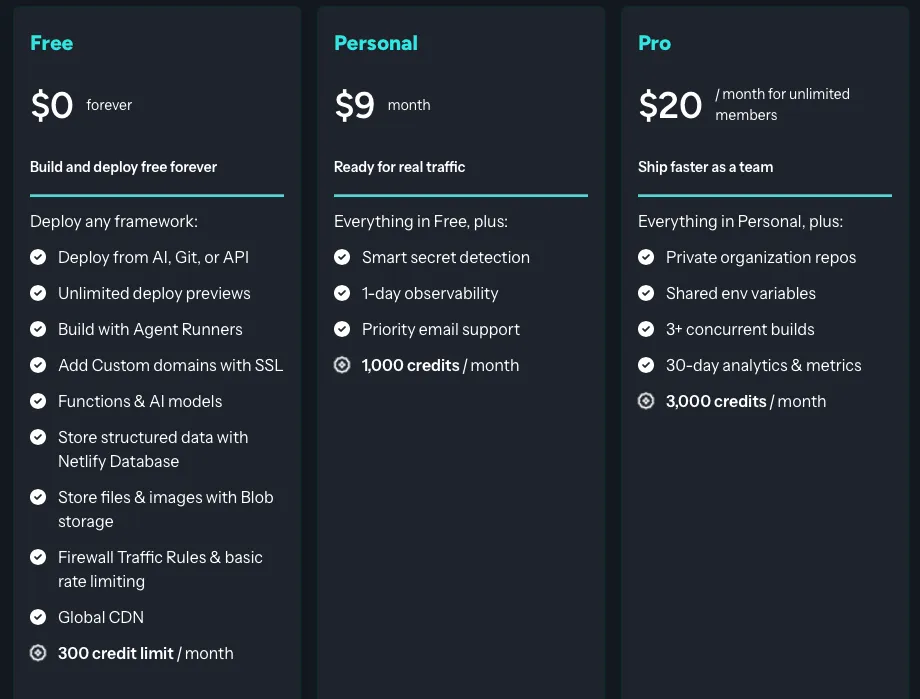
- Free: $0 forever, 300 credits/mo (individual) — deploys, bandwidth, compute, and requests all consume credits (e.g. 15 credits per production deploy, 20 credits per GB bandwidth)
- Personal: $9/mo, 1,000 credits/mo (individual) — everything in Free, plus smart secret detection, 1-day observability, and priority email support
- Pro: $20/mo, 3,000 credits/mo (team, unlimited members) — shared env vars, private org repos, 3+ concurrent builds, 30-day analytics
- Netlify Functions (serverless, AWS Lambda under the hood)
- Netlify Forms — submit HTML forms without writing a backend
- Netlify Identity for basic auth
- Edge Functions for low-latency logic
- Next.js support via
@netlify/plugin-nextjs— App Router and server components are supported, though bleeding-edge Next.js features may land on Vercel first
Honest pros for solo devs:
- Forms are genuinely a feature. If you need a contact form or waitlist signup and don’t want to provision a backend or pay for Formspree, Netlify Forms is right there.
- Simpler mental model for static sites. Hugo, Astro, Eleventy, Jekyll — all “just work” with minimal config.
- Generous free tier for hobby projects that don’t get hugged to death — and a Personal plan at $9/mo if you need more credits without paying for team features on Pro.
Honest cons:
- Next.js support exists but trails Vercel. Newer Next.js features sometimes lag, and edge cases with ISR or server actions occasionally surface. Check Netlify’s Next.js docs before betting your stack on day-one features.
- Credit limits bite on heavy builds. Each production deploy costs 15 credits; monorepos or slow builds eat the free 300-credit pool faster than you’d expect — Personal (1,000 credits) or Pro (3,000) is the usual upgrade path.
- The dashboard has grown busier as Netlify added Edge, Functions, Identity, Forms, Analytics — it’s no longer the “one config file and you’re done” tool it was in 2019.
See the full program details on the Netlify affiliate program page.
Vercel: what solo devs get in 2026
Vercel built Next.js, and it shows. If you’re using Next.js, deploying to Vercel is the smoothest path — vercel or git push and you’re done.
What’s included (per vercel.com/pricing and Hobby plan docs, May 2026):
- Git-based CD from GitHub/GitLab/Bitbucket
- Preview deployments per branch and per PR
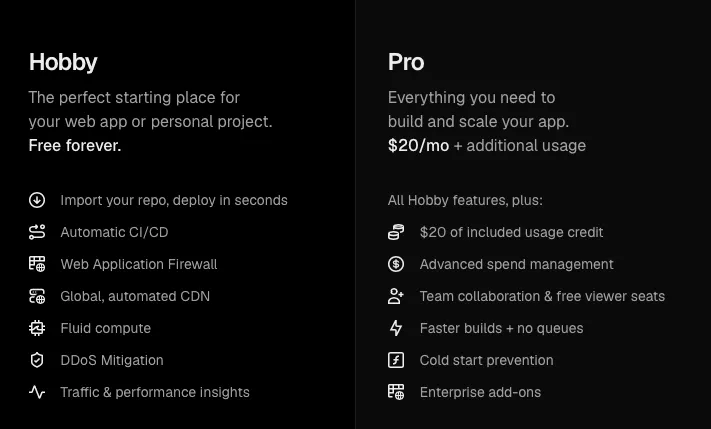
- Hobby (free): personal, non-commercial projects — includes 100GB bandwidth/mo and platform limits documented on the pricing page
- Edge Functions and Edge Middleware (V8 isolates)
- Serverless Functions (Node, Python, Go)
- Image Optimization built-in
- Web Analytics and Speed Insights (free tier limits apply)
- Strong integration with Next.js features: ISR, server actions, partial prerendering
Honest pros for solo devs:
- Next.js feels native because it is. Zero-config deploys, preview URLs that include working server actions, ISR that just works.
- Preview UX is polished. Comment threads on previews, password protection, easy sharing — handy if you ever loop in a designer or cofounder, even as a solo dev.
- Edge network is fast. Edge Functions run on V8 isolates; they generally feel snappier on cold starts than typical Lambda-backed setups, though your mileage varies by region and workload.
Honest cons:
- Vendor gravity is real. The more you lean on Vercel-specific features (Image Optimization, ISR with on-demand revalidation, Vercel KV/Postgres), the harder a future migration becomes.
- Pro overages can surprise you. Bandwidth and function execution beyond included credit are the usual bill spikes once a project gets traction.
- Non-Next.js frameworks work, but you can feel the second-class treatment — SvelteKit, Astro, Remix all deploy fine, but the docs and defaults assume Next.
Quick note on v0: Vercel’s v0 (AI UI generation) is a separate product but pairs naturally with Vercel hosting — you can generate a component, push to a repo, and have it deployed in minutes. Not a deciding factor for hosting, but a nice bonus if you’re already in the ecosystem.
See the full program details on the Vercel affiliate program page.
Head-to-head: 5 real deploy tasks
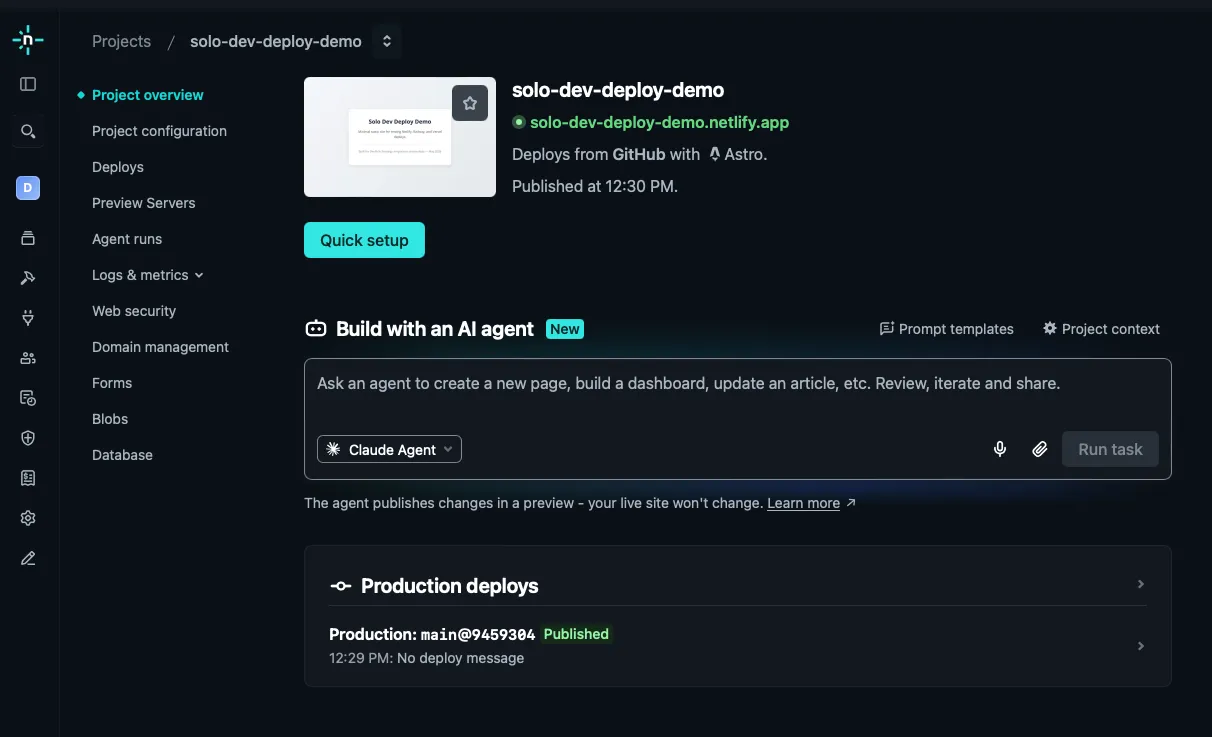
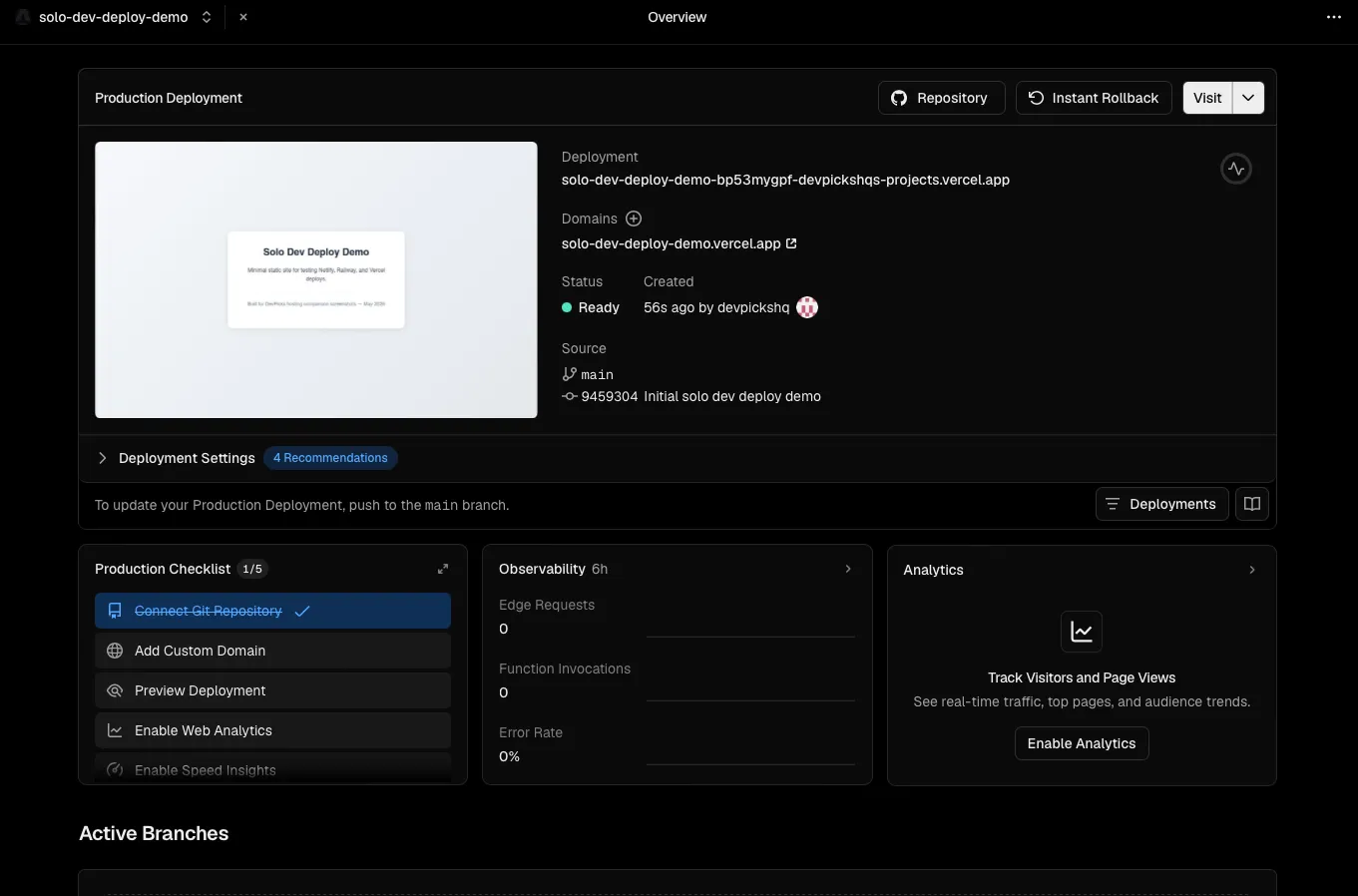
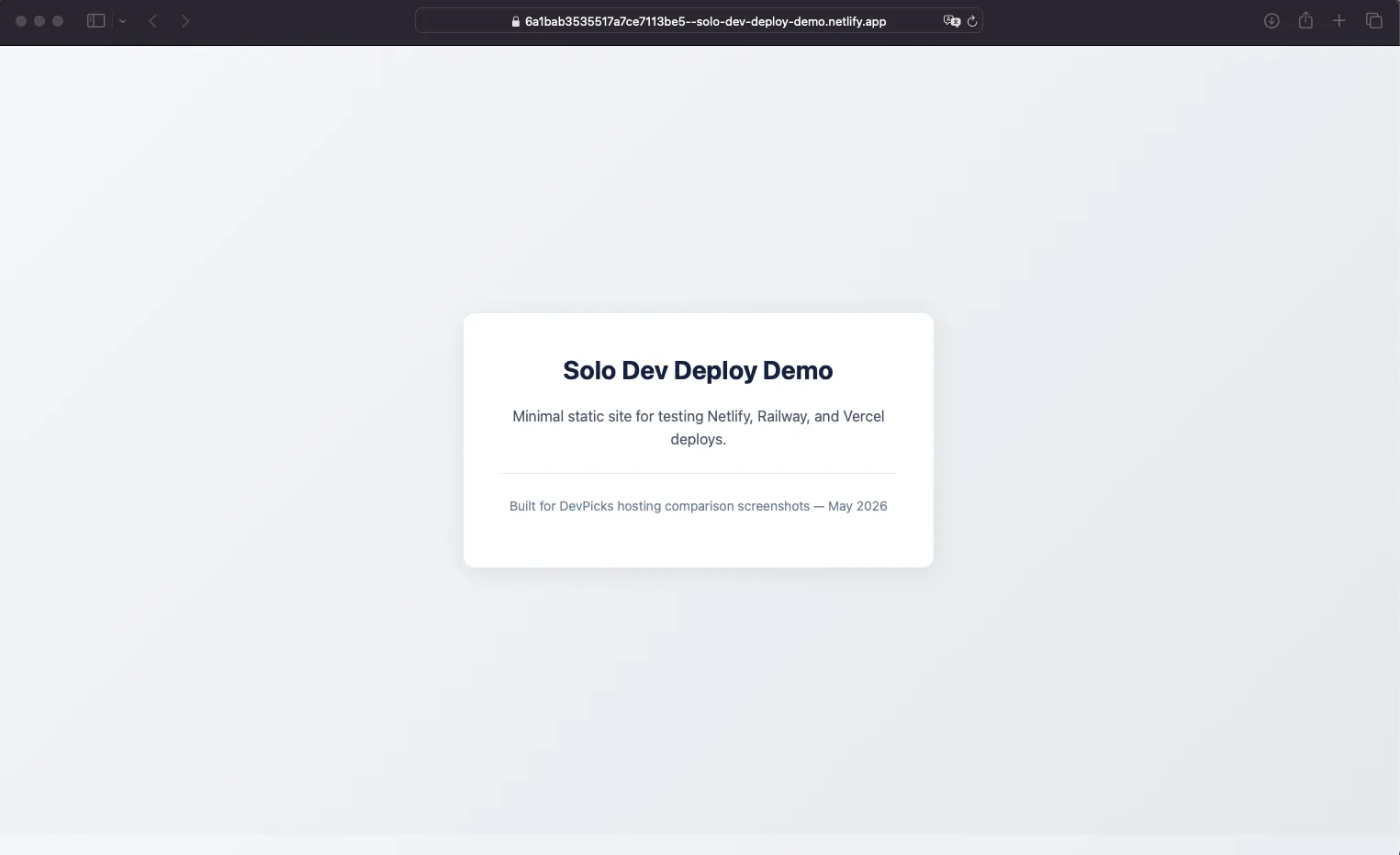
Walkthrough note. Dashboard screenshots in this post are from the author’s test accounts (May 2026). Task-by-task comparisons still follow official docs and common solo-dev deploy patterns — not timed benchmarks. Your mileage will vary by repo size, framework, and region.
1. Deploy a Next.js 15 app from GitHub
- Netlify: Connect repo → Netlify auto-detects Next.js → click Deploy. Build time varies with repo size and cache state. Most things work; you may need
@netlify/plugin-nextjsor config tweaks for newer Next.js features. - Vercel: Connect repo → done. Vercel built Next.js, so detection and defaults are tuned. Build time depends on the same factors.
- Winner: Vercel, narrowly. Both work; Vercel has fewer “wait, why isn’t this working” moments with bleeding-edge Next.js features.
2. Preview deployment on a PR
- Netlify: Every PR gets a deploy preview URL automatically. Posts a comment on the PR. Solid, no surprises.
- Vercel: Same — automatic preview per PR with comment. Adds extras like comment threads on the preview itself and easier password protection.
- Winner: Tie for raw functionality, slight edge to Vercel for the collaboration UX. If you’re a true solo dev with nobody to share previews with, this difference doesn’t matter.
3. API route / serverless function
- Netlify: Drop a file in
netlify/functions/or use Next.js API routes. Backed by AWS Lambda. Cold-start behavior varies by runtime and region. - Vercel: Next.js API routes deploy automatically. Edge Functions (V8 isolates) typically feel faster on cold starts than Lambda-backed alternatives for lightweight handlers. Node serverless functions are broadly comparable to Netlify.
- Winner: Vercel if you use Edge Functions; tie if you stick with standard Node functions.
4. Custom domain + HTTPS
- Netlify: Add domain → update DNS (either delegate nameservers or add A/CNAME records) → automatic Let’s Encrypt cert. Usually live within minutes.
- Vercel: Same flow — add domain, update DNS, automatic cert. Both platforms handle apex domains and
wwwcleanly. - Winner: Tie. This is a solved problem on both.
5. Monthly cost at solo scale
- Netlify: Free ($0, 300 credits/mo) covers most hobby projects. Need more headroom without team features? Personal is $9/mo (1,000 credits). Pro is $20/mo (3,000 credits, aimed at teams). Overages use credit packs ($5 per 500 credits on Personal, $10 per 1,500 credits on Pro).
- Vercel: Hobby is free for personal, non-commercial use. Pro is $20/user/mo with $20 of included usage credit; overages apply after that. Commercial projects require Pro — Hobby explicitly excludes commercial use per Vercel’s plan docs.
A small side project with modest traffic and light function usage can often stay on the free tier on either platform — but the threshold depends heavily on asset size, build frequency, and function invocations.
Winner: Depends entirely on traffic shape. For static-heavy sites with forms, Netlify often comes out cheaper. For dynamic Next.js apps with edge logic, Vercel’s pricing maps better to actual usage.
Netlify vs Vercel pricing breakdown
| Tool | Price | Pros | Action |
|---|---|---|---|
| Netlify | Free ($0) · Personal $9/mo · Pro $20/mo |
| Try → |
| Vercel ⭐ Recommended | Hobby $0 · Pro $20/user/mo |
| Try → |
A few things to check before you commit a credit card:
- Free-tier limits (300 credits on Netlify Free, bandwidth and requests on Vercel Hobby)
- First paid solo tier (Netlify Personal $9/mo vs Vercel Pro $20/user/mo for commercial apps)
- Build capacity (especially if you have a monorepo or heavy build step)
- Function invocation limits and execution duration caps
- Commercial use restrictions on Vercel Hobby
Run the numbers in our stack cost calculator before paying, especially if you’re stacking multiple paid tools.
My verdict: who should get which
Get Netlify if:
- You’re shipping static sites, Astro, Hugo, Eleventy, or other JAMstack frameworks
- You need built-in forms or identity without spinning up a backend
- You value a simpler mental model over edge-case Next.js performance
- You outgrow 300 free credits but don’t need Pro’s team features — Personal at $9/mo is the middle step
- Your project is content-heavy (marketing site, blog, docs) rather than app-heavy
Get Vercel if:
- You’re building with Next.js — full stop, this is the default answer
- You want best-in-class preview deployments for collaboration
- You’ll use Edge Functions or Edge Middleware for low-latency logic
- You’re prototyping with v0 and want the shortest path to production
Skip both if:
- You only need static hosting → Cloudflare Pages is often a strong fit for static-only workloads — check their current free-tier limits before deciding
- You need long-running servers, databases, or background jobs → Railway, Render, or Fly.io fit better
- You want maximum control or minimum cost at scale → a $5–10/month VPS with Caddy or Coolify can host the same workload for less, if you’re comfortable with sysadmin work
- You’re already deep in AWS → Amplify or raw CloudFront + Lambda may make more sense for billing consolidation
There is no universally correct answer here. The cheapest hosting is the one you don’t have to migrate away from in eighteen months.
FAQ
Is Vercel or Netlify better for Next.js in 2026?
Vercel, in most cases — they build Next.js, so new features land there first and the defaults are tuned for it. Netlify supports Next.js well via the official Next.js plugin and has closed much of the gap, but if Next.js is your primary framework and you want zero friction, Vercel is the safer default.
Can you host Next.js on Netlify for free?
Yes. Netlify’s free tier ($0, 300 credits/mo) supports Next.js including App Router and server components, subject to credit consumption on builds and traffic. For most hobby projects this is plenty.
Netlify vs Vercel pricing for solo developers — which is cheaper?
At the free tier, both are $0 for qualifying hobby use. Netlify’s first individual paid tier is Personal at $9/mo (1,000 credits); Pro at $20/mo adds team features and 3,000 credits. Vercel has no $9 middle tier — commercial work typically means Pro at $20/user/mo with $20 included usage credit, then metered overage. Netlify tends to win for static-heavy sites; Vercel maps better to dynamic Next.js apps.
Do I need Vercel if I’m building with Next.js?
No. Next.js is open source and runs anywhere Node runs — Netlify, Cloudflare, AWS, your own VPS. Vercel offers the smoothest experience for Next.js because they build it, but you’re not locked in. Be aware that some Vercel-specific features (Image Optimization defaults, ISR with on-demand revalidation, Vercel KV) require additional work to replicate elsewhere.
Which platform is easier for beginners deploying their first side project?
Both are roughly equivalent — connect a Git repo, click deploy, done. If you’re building with Next.js, Vercel has slightly fewer “why isn’t this working” moments. If you’re building a static site or using Astro/Hugo/Eleventy, Netlify’s defaults are friendlier. Either way, you should have a live URL quickly without touching DNS or build config in most cases.
Wrapping up
The honest answer to “Netlify vs Vercel in 2026” is: pick the one that matches your framework and don’t overthink it. Next.js → Vercel. Static/JAMstack → Netlify. Both have free tiers that cover real side projects, and both let you migrate out (with some effort) if your needs change.
The mistake to avoid isn’t picking the “wrong” platform — it’s paying for the wrong tier before you have traffic that justifies it. Stay on the free tier until usage forces you off, then re-evaluate with real numbers instead of hypothetical ones.
If you want to sanity-check total stack cost across hosting, database, auth, and analytics before you commit, the stack cost calculator will help.
Both have free tiers — start with whichever matches your stack, and you can upgrade only if traffic forces the decision.
Start free on Vercel → Start free on Netlify →